
Add these as hotkeys to drastically speed up your workflow!
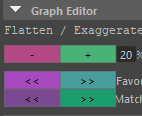
Copy a line each and paste as python hotkey.
Because I’m left handed, I have mine mapped to the right side of keyboard.
Each line below is a hotkey!
Enjoy! 🙂
#Flatten Curves (suggested hotkey: alt + -):
wesAnimTools.wesTools.wesKeyEditor.editKeys(0.2,'flatxagerate')

#Exaggerate Curves (suggested hotkey: alt + +):
wesAnimTools.wesTools.wesKeyEditor.editKeys(1.2,'flatxagerate')

#Favor/Cushion Left (suggested hotkey: alt + [ ):
wesAnimTools.wesTools.wesKeyEditor.editKeys(.3,'cushionLeft')

#Favor/Cushion Right (suggested hotkey: alt + ] ):
wesAnimTools.wesTools.wesKeyEditor.editKeys(.3,'cushionRight')


#Shift Keys Left (suggested hotkey: ctrl + [ ):
wesAnimTools.wesTools.wesKeyEditor.editKeys(-1, 'shiftKeys')


#Shift Keys Right (suggested hotkey: ctrl + ] ):
wesAnimTools.wesTools.wesKeyEditor.editKeys(1, 'shiftKeys')


#Match Keys Left (suggested hotkey: shift + [ ):
wesAnimTools.wesTools.wesKeyEditor.editKeys(1,'matchLeft')


#Match Keys Right (suggested hotkey: shift + ] ):
wesAnimTools.wesTools.wesKeyEditor.editKeys(1,'matchRight')